Property Manager Software: Features Every Growing Portfolio Needs in 2026
June 21, 2026

If your property manager software can't keep up with your portfolio's growth, you'll feel it first in the books — missed reconciliations, late owner statements, and compliance gaps that surface during audits.
Here's the short version: the property manager software that wins in 2026 isn't the flashiest one. It's the one that integrates cleanly with your accounting stack, automates trust accounting, supports multi-entity reporting, and gives your back-office team the visibility they need to close the books fast.
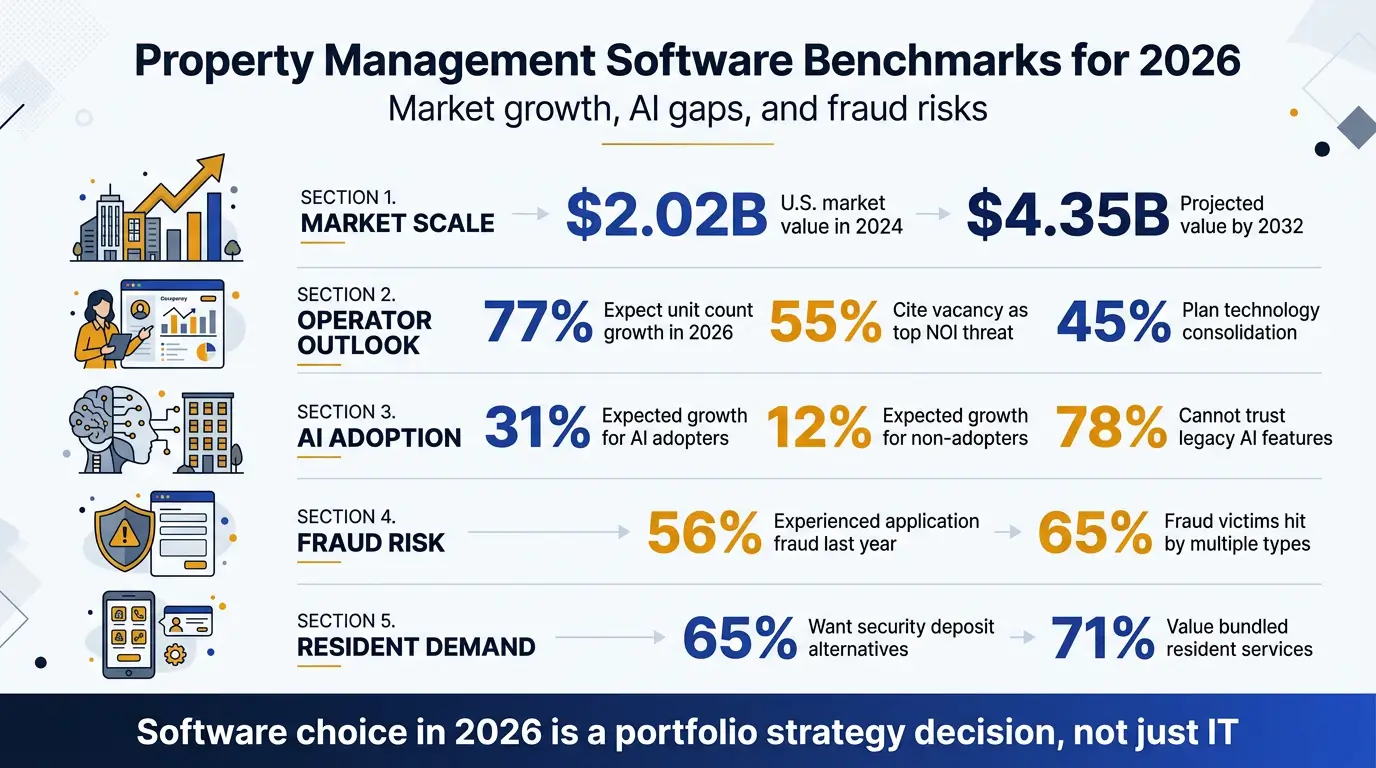
The category is also growing fast. The U.S. property management software market was valued at $2.02 billion in 2024 and is expected to reach $4.35 billion by 2032[1], which means more vendors, more features, and more pressure on operators to pick the right platform.
What you'll get from this guide:
- The must-have features for portfolios scaling past 100+ units
- How to evaluate trust accounting, owner reporting, and tax-ready bookkeeping inside your PMS
- Integration checkpoints with QuickBooks, AppFolio, Buildium, Yardi, and Rentvine
- Red flags that signal your current software is holding you back
- A practical migration and cleanup framework
Let's get into the features that actually matter when you're managing real money, real owners, and real compliance risk.
Why Your Property Manager Software Choice Matters More in 2026
Software used to be a back-office decision. In 2026, it's a portfolio strategy decision.
The reason is simple: rent collection, owner draws, vendor payments, 1099 reporting, sales and lodging tax, and bank reconciliations all flow through your property manager software. If that software is misconfigured — or your team is patching gaps with spreadsheets — you're not just inefficient. You're carrying audit risk.
The 2026 data backs this up. AppFolio surveyed 1,617 U.S. residential property management professionals and found that 77% expect to increase unit counts in 2026, while 55% cited elevated vacancy rates as the top threat to NOI[2]. Growth and pressure are happening at the same time, and the software stack is in the middle of both.
"The most successful firms are no longer just managing properties; they are managing performance." — Stacy Holden, Vice President, Industry Principal, AppFolio[2]
We see the same pattern across operators with 50, 200, or 2,000 units:
- Manual bookkeeping overload because the software was set up by a leasing person, not an accountant
- Software cleanup and migration issues from switching platforms without a real chart of accounts
- Compliance gaps in trust accounts, security deposits, and owner statements
- After-hours coverage holes when maintenance calls and emergency lockouts hit at 11pm
The right platform — set up correctly — solves most of this. The wrong one (or the right one configured badly) creates work no virtual assistant or bookkeeper can fully clean up later. If you want a sanity check before making a change, our team offers a free back-office and software audit that surfaces these gaps in plain language.
Core Accounting and Trust Account Features Your Property Manager Software Needs
This is non-negotiable. If your software can't do these things cleanly, nothing else matters.
True Double-Entry Accounting
Some "property management" tools track rent rolls but use single-entry logic for finances. That works until your CPA asks for a trial balance and you can't produce one.
Look for software with a real general ledger, journal entries, and the ability to export a trial balance, P&L, and balance sheet per property and per entity.
Trust Accounting and Sub-Ledger Support
If you hold owner funds or security deposits, trust accounting isn't optional — it's a statutory requirement in most U.S. states. Your software needs to:
- Maintain a separate trust ledger per owner and per property
- Prevent commingling between operating and trust accounts
- Reconcile the trust bank account to the sum of owner sub-ledgers (the three-way reconciliation)
- Produce state-compliant trust reports on demand
Three-way reconciliation is the audit point most operators fail. A clean PMS makes it a one-click report. A messy one makes it a three-day forensic exercise.
Automated Bank Feeds and Reconciliation
Manual transaction entry is where errors start. Modern property manager software pulls bank and credit card feeds automatically, matches transactions to invoices and receipts, and flags exceptions. Automated postings to the ledger also reduce data-entry errors and lower payroll and accountant costs[3]. If your team is still typing in deposits, you're paying for software twice — once for the license, once for the labor.
1099 Tracking for Vendors and Owners
The IRS treats property managers as withholding agents for owner distributions in many cases. Your software should track vendor payments by tax ID, generate 1099-NEC and 1099-MISC forms, and produce owner 1099s for distributed rents. Doing this in Excel at year-end is how mistakes happen.
Once accounting is solid, the next priority is making sure owners and tenants see the right information at the right time.
Owner and Tenant Portal Features That Actually Get Used
A portal nobody logs into is just a checkbox. The portals that drive adoption — and reduce inbound calls to your office — share a few traits.
For Owners
- Real-time financials: income statement, cash flow, and distribution history available 24/7
- Document vault: leases, inspection reports, insurance certificates, and tax documents in one place
- Distribution tracking: when the ACH hits, when the next one is scheduled, and what's being held in reserve
- Mobile-first design: most owners check on their phones, not a desktop
For Tenants
- Online rent payment with ACH, card, and (increasingly) digital wallets
- Maintenance request submission with photo/video upload
- Lease renewal and document signing in-app
- Automated reminders for rent, lease expiration, and inspections
Resident expectations are climbing too. AppFolio's 2026 benchmark found that 65% of residents want security deposit alternatives and 71% value bundled services[2]. If your portal can't surface those options, your competitors' portals will.
The single biggest driver of bookkeeping cleanup work we see is tenants paying outside the portal — cash, paper checks, Venmo to a property manager's personal account. Closing that loophole inside the software saves more time than any other single fix.
Portals reduce phone volume, but they don't eliminate it. That's where automation comes in.
Automation and Workflow Features for Scale
At 20 units, you can manage with reminders and good habits. At 200, automation is the only way to keep margins intact. Buildium's portfolio-growth guide makes the point bluntly: every vacant day costs owners money and reduces management fees, which makes lead-to-lease automation a revenue issue, not a convenience[4].
Lease Lifecycle Automation
Your software should trigger:
- Renewal notices 90, 60, and 30 days out
- Rent increases based on lease terms or market data
- Move-out inspections and security deposit disposition timers (these are state-regulated, often 14–30 days)
- Late fee assessment based on your jurisdiction's rules
Maintenance Workflow
A good maintenance module routes requests to the right vendor by trade and property, tracks work orders to completion, captures before/after photos, and pushes the invoice directly into the bill-pay queue. The best ones include vendor portals so contractors submit invoices without email back-and-forth.
AP Automation and Bill Pay
Bills come in by email, PDF, paper, and vendor portal. The right software ingests them via OCR, codes them to the correct property and GL account, routes them for approval, and pays via ACH. This is where outsourced bookkeeping teams add the most value — running the AP queue daily so nothing slips.
Recurring Charges and Auto-Posting
Rent, parking, pet rent, utility reimbursements, and HOA fees should post automatically on schedule. If your team is manually creating invoices each month, the software isn't earning its keep.
AI That's Actually Connected to the Workflow
2026 is a turning point for AI inside property manager software. AppFolio found that firms with broad AI adoption expect average portfolio growth of 31% in 2026, nearly triple the 12% expected by firms that haven't implemented AI[2]. But the same report shows the trust gap is real: 78% of respondents said they cannot yet rely on AI features in their legacy property management software[2]. AI matters when it's embedded in leasing, maintenance, finance, and reporting — not when it's bolted on as a marketing badge.
Automation handles the predictable work. Reporting is what tells you whether the portfolio is actually performing.
Reporting and Analytics for Multi-Property Portfolios
Owner statements are table stakes. What separates growing operators is the ability to slice data across the portfolio and answer questions in minutes, not days.
Reports You Should Be Able to Run in One Click
| Report | What It Tells You | Frequency |
|---|---|---|
| Rent Roll | Occupancy, market rent vs. actual, lease expirations | Weekly |
| Delinquency Aging | Who's behind, by how much, and how long | Weekly |
| NOI by Property | True profitability per asset | Monthly |
| Trust Reconciliation | Three-way match for compliance | Monthly |
| Owner Statement | Income, expenses, distributions per owner | Monthly |
| Budget vs. Actual | Variance by property and GL account | Monthly |
| CapEx Tracking | Project spend vs. budget, depreciation schedule | Quarterly |
Portfolio-Level Dashboards
Executives shouldn't be opening 40 owner statements to understand portfolio health. A dashboard that shows occupancy, collections, delinquency, and NOI across the entire book — with drill-downs to the property and unit level — is what unlocks decision speed.
Custom Reporting and Export
You will need reports the software doesn't ship with. Make sure you can export raw GL data to Excel or a data warehouse, and that the software has an open API. Locked-in reporting is a slow-motion problem you only feel when it's too late to fix easily.
None of this matters if the software can't talk to the rest of your stack.
Integrations That Matter for Property Manager Software in 2026
No single platform does everything well. Operators that scale treat their PMS as the operations hub and connect specialty tools around it. AppFolio's benchmark found 45% of operators plan to consolidate technology in 2026[2] — but consolidation only works when the hub plays well with the spokes.
Accounting Integrations
Even if your PMS has built-in accounting, your CPA may want data in QuickBooks Online or a dedicated GL system for consolidated entity reporting. Verify the integration is real-time (or at least nightly) and doesn't break when you add new properties or entities. We've seen "integrations" that are just CSV exports rebranded — that's not integration, that's homework.
Banking and Payments
- ACH for rent collection and owner distributions
- Lockbox or remote deposit for paper checks
- Card processing with surcharge support where legal
- Reserve account management for HOAs and capital reserves
Short-Term Rental and Hospitality
If you mix long-term and short-term rentals, your software needs to connect to channel managers (Airbnb, Vrbo, Booking.com), handle lodging tax, and track occupancy taxes by jurisdiction. Lodging tax compliance varies by city, county, and state — and the penalties for getting it wrong stack quickly. Hospitality tech investors are betting heavily on this layer; a recent industry report noted that hospitality tech attracted roughly $1 billion in funding, led by property management systems and AI[5].
Construction and CapEx
For operators with construction or major renovation work, the PMS should connect to job-costing tools or at minimum support project-level GL codes, AIA-style draw schedules, and lien waiver tracking. If you're juggling capital projects alongside operations, specialist back-office support can keep job costs and operating books from bleeding into each other.
Communication and AI
AI-assisted tenant communication, lease abstraction, and document processing are quickly becoming standard. PwC notes that AI is reshaping leasing, management, and operations across real estate[6]. Look for software with native AI features or open APIs that let you plug in tools for transcription, after-hours call handling, and document classification.
The integration question we ask every client during a software audit: "If you doubled your portfolio next year, which of these tools would break first?" That's almost always where the migration conversation starts.
Once the stack is connected, the next layer is making sure the data inside it is secure.
Security, Compliance, and Audit-Readiness Features
Property managers hold a lot of sensitive data: SSNs from rental applications, bank accounts for ACH, owner tax IDs, lease terms, and trust funds. Your software needs to protect all of it. And fraud is no longer a fringe concern — 56% of managers experienced application fraud in the prior year, with 65% of those facing multiple types of fraud[2].
Baseline Security Requirements
- SOC 2 Type II certification — verify it, don't take their word for it
- Role-based access controls so a leasing agent can't see owner financials
- Multi-factor authentication required for all users, not just admins[3]
- Audit logs showing who changed what and when
- Encrypted data at rest and in transit
Compliance Features
- Fair Housing: screening workflows that apply the same criteria to every applicant, with documentation
- State trust accounting: report formats that match your state's requirements (Florida, California, Texas, and Arizona all differ)
- 1099 and W-9 collection: digital W-9 capture before first vendor payment
- Document retention: lease and financial records held per your state's retention rules (often 3–7 years)
Audit-Readiness
An audit-ready portfolio means: any transaction can be traced from source document to bank to GL to financial statement in under five minutes. If your software doesn't store source documents (invoices, receipts, leases) attached to the transactions, you're not audit-ready — you're audit-exposed.
This is where trained back-office support earns its keep: keeping documentation attached, reconciliations current, and trust accounts clean every month, not just at year-end.
Now, what about the software you already have?
Red Flags Your Current Property Manager Software Isn't Keeping Up
You don't always need to switch platforms. Sometimes you need to fix the setup. But these signals usually mean something has to change:
- Month-end close takes more than 10 business days. A clean portfolio closes in 5–7. If yours takes longer, the bottleneck is either the software, the process, or both.
- Bank reconciliations have un-reconciled items older than 60 days. Stale items become permanent variances.
- You can't produce a three-way trust reconciliation in one click. Compliance risk.
- Owner statements are manually adjusted in Excel before sending. Means the software isn't producing accurate output.
- You're running parallel systems — PMS for operations, QuickBooks for accounting, spreadsheets for owner reporting — without integration. Triple data entry, triple errors.
- Adding a new property takes more than an hour. Setup friction kills growth.
- Your team is in the software 8 hours a day but still behind. Either the workflow is wrong or the platform isn't built for your volume.
- You can't answer "what was our portfolio NOI last month?" in under 5 minutes.
If three or more of these apply, it's time for either a configuration overhaul or a migration. Both should start with a software audit.
How to Evaluate and Migrate to New Property Manager Software
Step 1: Audit What You Have
Before evaluating new software, document the current state:
- Chart of accounts (is it clean and consistent across properties?)
- Open AR and AP balances
- Trust account balances and three-way reconciliation status
- Active leases, vendors, and owners
- Custom reports and workflows in current use
- Integrations and data flowing in/out
A free software audit and strategy call is usually the right starting point — it surfaces cleanup work that needs to happen regardless of whether you switch platforms.
Step 2: Define Requirements by Portfolio Type
| Portfolio Type | Priority Features |
|---|---|
| Single-Family Rentals (SFR) | Owner reporting, 1099s, distributed property management, ACH |
| Multifamily | Unit-level analytics, renewals, AP automation, budget vs. actual |
| Short-Term Rentals | Channel manager integration, lodging tax, dynamic pricing |
| HOA / Community | Assessment tracking, reserve studies, board reporting |
| Construction / Development | Job costing, draw schedules, lien waivers, CapEx tracking |
| Mixed Portfolio | Multi-entity reporting, consolidated dashboards, flexible GL |
Step 3: Run a Real Demo, Not a Sales Demo
Bring your own data. Ask the vendor to:
- Import 10 of your actual leases and run a month of activity
- Produce an owner statement from your real numbers
- Run a three-way trust reconciliation
- Show the audit log for a corrected transaction
If the demo team can't do this in real time, the software probably can't either.
Step 4: Plan the Migration
Migrations fail when they're rushed. A typical clean migration for a 200-unit portfolio takes 8–12 weeks and includes:
- Chart of accounts mapping and cleanup
- Historical data conversion (usually 2 years of GL, all open balances)
- Tenant and owner re-onboarding to the new portal
- Parallel run for one full close cycle
- Trust account transition and re-reconciliation
This is the work that creates the "software cleanup and migration" headaches most operators dread. Done right with an experienced team, it's the inflection point that unlocks the next stage of growth.
Step 5: Train, Document, and Maintain
Software is only as good as the people using it. Build playbooks for:
- Daily AR (rent posting, deposits, exceptions)
- Daily AP (bill entry, coding, approval)
- Weekly delinquency follow-up
- Monthly close (reconciliation, owner statements, trust reports)
- Annual (1099s, budgets, audit prep)
Most operators we work with don't need more software. They need someone running the software correctly, every day, with documented processes. Interestingly, AppFolio found that 34% of AI adopters planned to increase headcount, compared with 25% of non-users[2] — the firms automating most are also the ones investing most in trained teams. That's where outsourced bookkeeping, virtual assistants, and after-hours coverage compound: the platform produces the data, the trained team keeps it clean.
Key Takeaways
The right property manager software in 2026 is the one that protects your money, your compliance posture, and your team's time as the portfolio grows. To recap:
- Accounting and trust are the foundation — double-entry GL, three-way reconciliation, and 1099 tracking are non-negotiable.
- Portals and automation drive adoption and margin — close the side-channel payment loopholes and let the system handle recurring work.
- AI matters when it's embedded, not bolted on. Legacy AI features are still failing the trust test for most operators[2].
- Integrations and security separate scalable stacks from fragile ones.
- Migration is a process, not a project — clean source data and trained operators decide whether it works.
If you're rethinking your stack going into 2026 — or just trying to figure out whether cleanup, migration, or better day-to-day support is the right next move — a free strategy call and software audit with Optimal is the fastest way to get clarity on what's working, what isn't, and what scale-ready looks like for your portfolio.
FAQs
What's the difference between property manager software and accounting software?
Property manager software handles operations (leases, maintenance, tenant communication, rent collection) plus property-specific accounting. General accounting software like QuickBooks handles the books but doesn't understand units, leases, or trust accounting. Most growing portfolios use a property manager software as the system of record and either rely on its built-in accounting or integrate it with QuickBooks for consolidated entity reporting.
How much should I budget for property manager software in 2026?
Most platforms price per unit per month, ranging from about $1.50 to $4.00 per unit for SFR and multifamily, with minimums that make small portfolios feel expensive. Short-term rental and hospitality tools often charge a percentage of revenue or per-listing fee. Budget separately for setup, data migration, training, and ongoing bookkeeping — software alone rarely replaces the labor needed to run it well.
Can I run multiple entities and portfolios in one property manager software?
Most modern platforms support multiple entities, but the quality varies. Look for true multi-entity GL separation, consolidated reporting across entities, and per-entity bank account and trust account support. If you have complex ownership structures, JV partners, or syndicated deals, validate the entity model during the demo with your actual structure.
How long does it take to migrate to new property manager software?
For a portfolio under 100 units with clean books, 4–6 weeks is realistic. For 100–500 units, expect 8–12 weeks. Portfolios with messy historical data, multiple entities, or trust account complications can take 4–6 months. The biggest variable isn't the software — it's how clean the source data is going in.
Do I still need a bookkeeper if my property manager software has accounting built in?
Yes. Software automates data entry and reporting but doesn't make accounting decisions, catch errors, reconcile trust accounts, or prepare you for an audit. A bookkeeper — in-house or virtual — runs the daily and monthly workflows that turn the software's output into accurate, audit-ready financials. The two work together; neither replaces the other.
You might also be interested in




100% Match Guarantee
We stand by the quality of our Team Members and guarantee that you will be 100% satisfied with the Team Member assigned to you. If you don't see the value-add, we'll replace and train a new Team Member for free.